Showing posts with label Apps. Show all posts

Jan 6, 2011

Great photo-editing app for iPad - Photogene 2.0


Got this off Wired, makes me wish I had an iPad. This is one awesome photo-editing app, it even has the Clone and Heal tools! Coupled with Eye-Fi's SD Card's wireless transfer of images, editing on the go becomes a huge possibility. Start phasing out desktops please.

Read more at Wired Gadget Lab.

Nov 3, 2010

Skyfire App allows Flash on iOS devices

Skyfire is a web browser that automatically transcodes Flash video into HTML5 so it can display on your iDevice (instead of the blue Lego block symbolizing a lack of Flash support).


Read more at Wired Gadget Lab.

Oct 7, 2010

Instagram App - like Lomo-twitter for your iPhone pics


Got this off Wired Gadget Lab - an app that promises to be a "big deal", like Twitter and Facebook social network big!

This app gives you free lomo-effects to your iPhone pictures and then allows you to share your images on the network or Facebook etc (it also communicates with FourSquare to geotag your images). People are already doing it on Facebook, so will it really be all there? Well, you read it here first! (well, at WGL anyway).


Update:
I signed up but seemed to have a problem logging in. =P

Aug 26, 2010

Awesome Drop Transfers Files to Your Android Device

If for some reason, connecting your Android device to your PC for purposes of file transfers is troublesome and not something you see happening a lot of, try this app "Awesome Drop" for over the air transfers. Simple drag-and-drop, see vid for how it works:


Via Lifehacker.

Auto Rotate Switch for Android


If you're the kind who likes to read on your phone while lying in bed, this may be the very app that you're looking for - to stop your screen from auto-rotating. You know how infuriating it is when you're trying to read a FB status or test on a website when your screen keeps auto-rotating because the phone doesn't understand that you're no longer standing or sitting upright. Yup, this solves it. This app stops the screen auto-rotation without needing you to go thru several layers of menu to get to it. It sits on your home screen as a short-cut (not a widget, so it doesn't suck up memory), and you simply toggle it on/off as desired. Nice.

QR code and links via Lifehacker.

May 10, 2010

Explore the World of Android Apps


Gizmodo and Verizon have teamed up to bring you the brand-new Essential Android Apps Directory, a compendium of the best apps—complete with insightful descriptions and QR codes to instantly grab the apps you need. It's a must-bookmark page for all droid owners. Click here to check it out!

Via Lifehacker.

Apr 9, 2010

Fox Splitter/ Split Browser &


Ever needed to open 2 browsers at the same time to compare notes or take notes? Lifehacker featured the Chrome extension Split Screen which allows you to do just that. Firefox already has such an extension called Fox Splitter (previously called Split Browser. Check out the LH article here.

Chrome: Split Screen.
Split Browser/ Fox Splitter.

Mar 15, 2010

Photo Magician Batch Convertor

Lifehacker reviews an image batch convertor - Photo Magician.
This is for those of you who want to rename or move a whole bunch of your newly downloaded pictures off your camera from your last trip faster.

Read more at Lifehacker.

Mar 10, 2010

TypeWith.Me makes online collaboration a breeze


Just like Google Wave's real-time text editing features, TypeWith.Me is an online app that makes co-editing online a breeze, and easier too. Furthermore, you won't even need to register.
Getting started with this free app is as simple as clicking the New Document button on the site's home page. You're instantly dropped into an edit-ready page where you can start typing right away, or import an HTML, plain text, RTF, or Word document.

Each online document has its own unique URL you can share with others for real-time co-editing, and there's a small window for chatting on your edits. TypeWith.me helpfully assigns different colors to each author so you can easily track who's typed what, and the app instantly synchronizes as you type so changes appear in real time. When you're done, export your work to one of six file formats, including Word, PDF, and HTML.

Read more about how Google bought and shut the origin of this (yet another Google giant footstomp) from Lifehacker. Read the comments for alternatives as well.

Mar 5, 2010

Paper Rater analyzes your writing skills


If writing skills are a concern to you, perhaps this online app can help offer suggestions and improvements. Copy a chunk of the text you want analyzed, paste it in the space designated, and mark it as "essay, research paper, speech" etc, and Paper Rater will return suggestions, corrections and commentary on your writing style. Always good to have a source of criticism that you can't get angry with.

Via Lifehacker.

Feb 25, 2010

Battle of Puppets - for iPhone

This looks like an interesting strategy game. The graphics are uniquely cut-out, and the theme of the game is opera.. Available at 99 cents for a limited time, do consider it for an upgrade of your run-of-the-mill terrible free games.
The game has a surprising amount of strategic depth -- more than you'd expect for an iPhone title. There are five different armies (each one representing an "opera" theme), each with its own strengths and weaknesses, and the little unit battles play out over 22 different theaters, where various environmental changes can actually affect the strategy of the game. And in addition to commanding your puppet troops, you can "cast spells" on the screen with gesture input, which will also affect the flow of battle. It's almost too much to handle on the iPhone's small screen, but the developers have added in a tutorial that should help you figure it out.


Via TUAW.

Flavors.me

Another online App that pulls together info from several services like Facebook, Twitter, Tumblr, etc, to create a splash page of your online personality. Check out the video to see how it works:

Flavors.me from Jack Zerby on Vimeo.


Then go to Flavors.me, via Lifehacker.

MeetWith.Me online scheduler


This online app allows you to have your own appointment calendar online for clients/friends to pick a date to meet you. Thankfully, it omits the private details of who and what, just showing viewers when you are potentially free for an appointment. Pretty good for the busy executive or marketing persons, or the really popular among us.

Via Lifehacker.

Feb 12, 2010

LookInMyPC Is a Must-Have Tool for Computer Troubleshooting

Whether you're a tech guru who knows your way around your computer better than the company that built it, or a novice just getting acquainted with your system, LookInMyPC is a free app you'll want to download and run at least once, even before you need its diagnostic help. It's like a big verbal X-Ray of your PC, detailing everything from the brand of network adapter you have to the number of user accounts on your system.

LookInMyPC is also a great tool for diagnosing computer issues, especially if you're troubleshooting an unfamiliar computer. Instead of spending time poking around your uncle's PC to figure out basic system information, just generate a general report with memory and operating system information, then get down to business. Once you have a feel for what issues you're trying to correct, you can generate more specific reports like Registry Run Entries or Firewall Info. LookInMyPC even gives you data on Windows updates, recent System Restores, and the default email client.

Copied wholesale from Lifehacker.

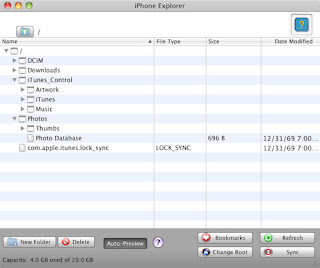
iPhone Explorer - transfer music and photos easily


Mac/Windows: Ok, I found it ridiculously difficult to extract my photos from my iPhone when I was backing up and clearing them out. I also hate that I have to use iTunes to manage my music in the phone (I also hate iTunes in general but that's besides the point). Now with iPhone Explorer, which is free for downloads, you can plug in your phone and manage your files just like you would any other USB drive! One caveat - the program has issues copying multiple files at a time, the recommended solution is to place them in a folder and transfer the entire folder (with its contents in it).

You don't need to jailbreak your phone to use this, but if you do jailbreak it, the explorer allows you to put the files directly where you want it, without the need for complex SSH setups.

Read more at Lifehacker.

Feb 10, 2010

Give System Restore a chance

Apparently, System Restore on Windows Vista and 7 are much better than the crap it is in XP. Want to learn more about the new System Restore and how you can use it to save your bad driver installs and others.
Check out Lifehacker's Complete Guide to System Restore - "its's better than you remember!"

Jan 26, 2010

Avast Free Antivirus, newly launched version


It's lighter, faster, and more feature-filled than ever, bringing a new behavior shield, heuristics engine, and code emulator to keep you protected at all times.

From Lifehacker.

Open Shot - Linux Video Editor


Lifehacker featured a simple Linux Video Editor here. Read more and download!
.. I dropped an audio file into the left-hand sidebar, and it automatically dropped into one of the two default tracks. I dragged in a batch of pictures, and I could then drop them onto the timeline. From there, you can use the really simple tools—resize, razor, marker, and moving tool—to adjust and arrange the clips. For my purposes, that was perfect. It was a return to earlier versions of iMovie, a basic non-linear video editor for the rest of us. ~from Lifehacker

Jan 13, 2010

Amarok Media Player updated

Now available at version 2.2.2 "Maya Gold" edition for Linux, Windows & Mac.
Amarok is a powerful music player for Linux and Unix, MacOS X and Windows with an intuitive interface. It makes playing the music you love and discovering new music easier than ever before - and it looks good doing it!

Via Lifehacker.

Wink | Shutterfly App


This iPhone app allows you to edit a series of pictures into a strip, like those strip of 4 or 6 photos from the olde photo booths. Once done, an order is sent and for only US$2.50, the photo strip you created will be sent to you anywhere in the world. Or to your friends.

Makes for very good thank you cards or for capturing those special moments in an easily-viewed series. Also makes for a very good idea for those of you savvy with Photoshop and such editors..

Find out more from their own website here. Via Wired Gadget Lab.